Weather Radar Colors Explained: How to Read Radar Like a Pro
Learn what weather radar colors mean, from light green to purple. Understand reflectivity, precipitation intensity, and how to interpret radar images.
What Do Weather Radar Colors Mean?
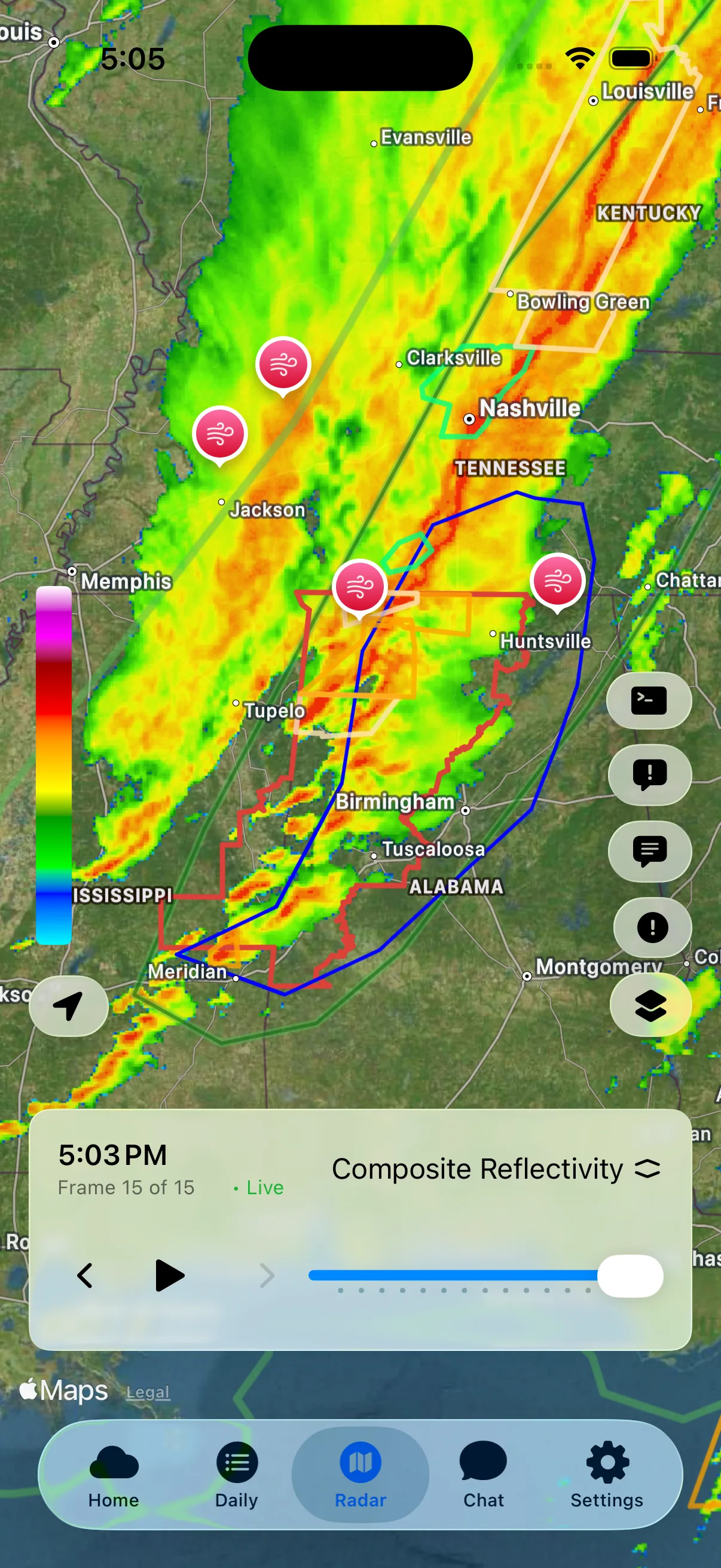
You've probably seen those colorful weather radar maps, swirls of green, yellow, and red sweeping across your region. But what do those colors actually represent? Understanding radar colors helps you estimate the strength of radar returns, but color alone cannot tell you whether a storm is dangerous.
The short version: on a standard reflectivity map, green is light to moderate rain, yellow is moderate to heavy rain, orange and red are heavy rain with hail possible, and purple or magenta is the most intense return on the scale, often from large hail. The sections below give the dBZ range behind each color and explain when the colors can mislead you.
How Weather Radar Works
Weather radar sends out pulses of microwave energy. When these pulses hit precipitation (rain, snow, hail), some energy bounces back to the radar. The strength of the returned signal is called reflectivity, measured in dBZ (decibels of Z).
Higher reflectivity means a stronger radar return. It often corresponds to heavier precipitation, but particle type and size, hail, distance from the radar, and non-weather targets can also affect the value.
The Standard Radar Color Scale
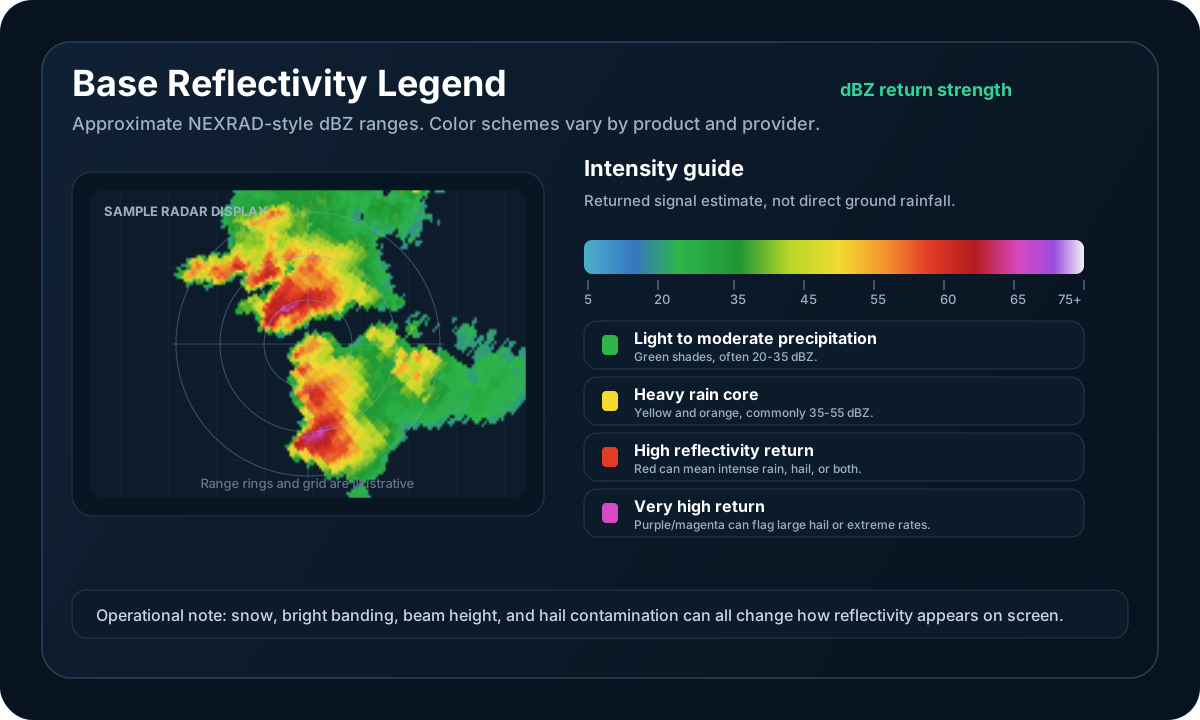
Most weather radars use a similar progression from cool to warm colors, though exact color schemes vary between providers. The dBZ ranges below are approximate; always check the legend on your specific radar source.
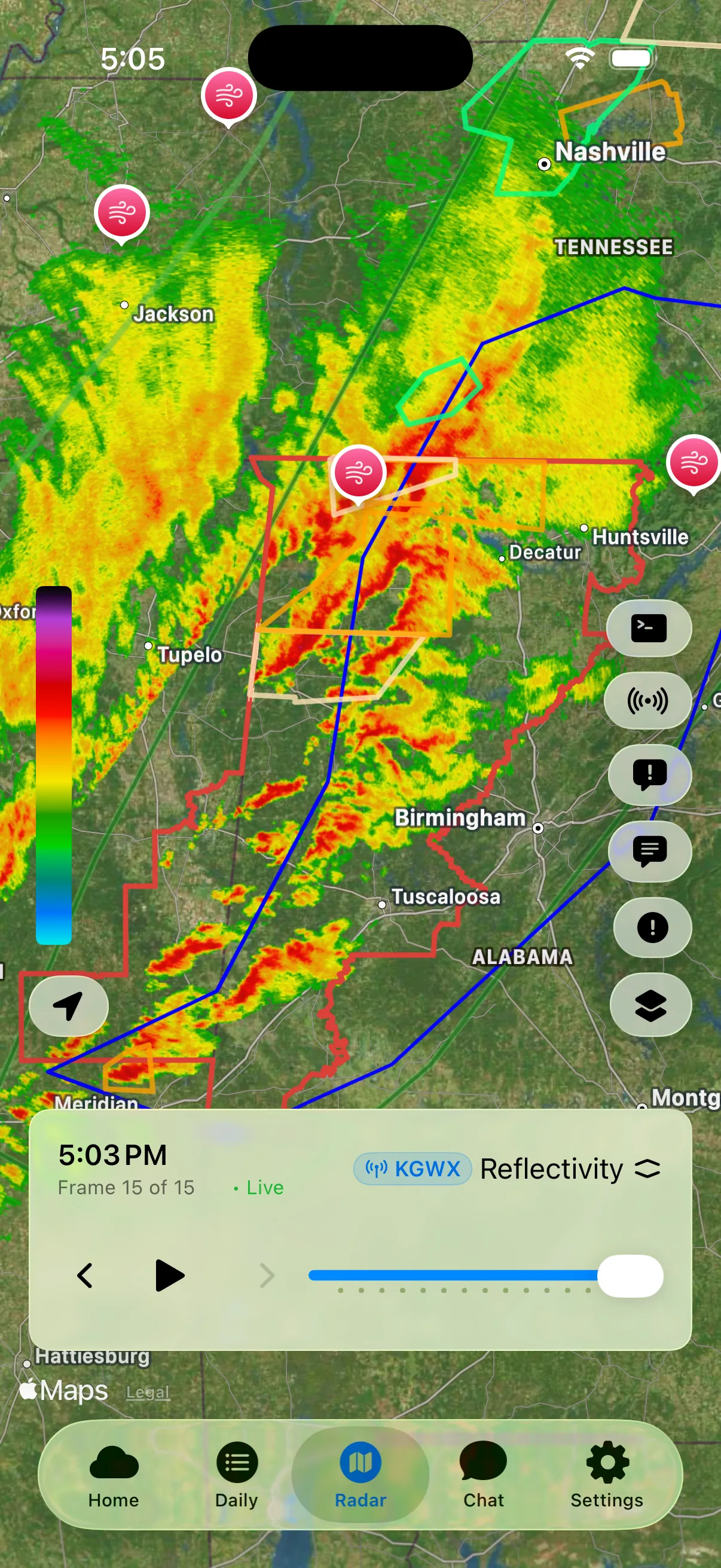
Lower Reflectivity (Green Shades)
| Color | dBZ Range | What It Means |
|---|---|---|
| Light Green | 5-20 dBZ | Light rain, drizzle, or light snow |
| Green | 20-30 dBZ | Light to moderate rain |
| Dark Green | 30-35 dBZ | Moderate rain |
What to expect: These colors often represent lighter precipitation, but impact depends on precipitation type and surface conditions. Light-looking snow or freezing precipitation can still make travel hazardous.
Moderate Reflectivity (Yellow/Orange)
| Color | dBZ Range | What It Means |
|---|---|---|
| Yellow | 35-40 dBZ | Moderate to heavy rain |
| Orange | 40-50 dBZ | Strong return, often from heavy rain |
| Dark Orange | 50-55 dBZ | Very strong return; heavy rain or hail may contribute |
What to expect: Reduced visibility and ponding may occur under heavy rain. Hail is possible in thunderstorms, but color alone cannot confirm it.
High Reflectivity (Red/Purple)
| Color | dBZ Range | What It Means |
|---|---|---|
| Red | 55-60 dBZ | Intense return from heavy rain and/or hail |
| Dark Red | 60-65 dBZ | Very intense return; hail is possible |
| Purple/Magenta | 65+ dBZ | Extreme reflectivity; large hail may contribute |
What to expect: Torrential rain, flooding, and hail may be possible depending on the storm and environment. Check official warnings, dual-polarization products, and ground reports; a red or purple pixel alone does not establish the hazard.
Special Radar Signatures
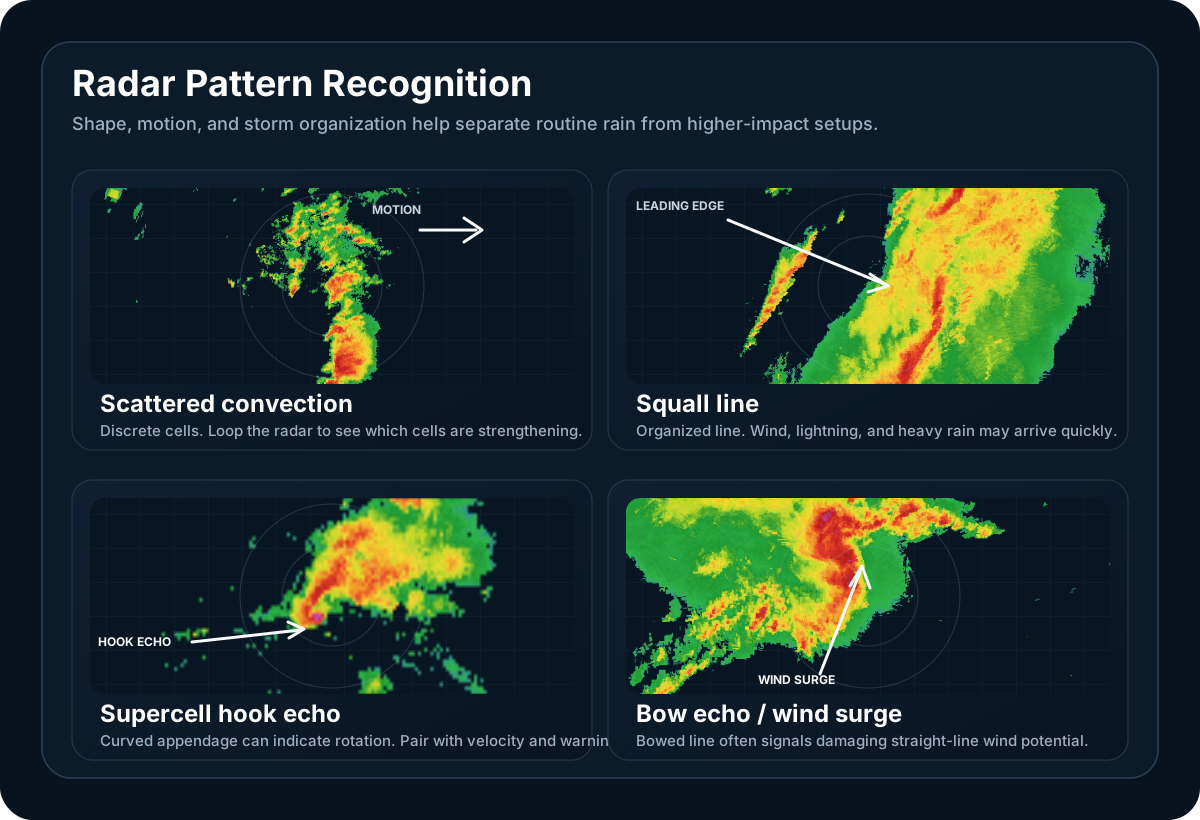
Beyond basic colors, certain patterns can provide clues about storm structure and possible threats:
Hook Echo
A hook-shaped appendage on the rear flank of a storm can be associated with a rotating mesocyclone and an environment favorable for tornado development. A hook echo by itself does not confirm a tornado.
What to do: Check official warnings immediately. If a tornado warning includes your location, take shelter without waiting to confirm the signature yourself.
Bow Echo
A curved line of storms shaped like an archer's bow can signal an enhanced risk of damaging straight-line winds. Actual wind speed and impact vary from storm to storm.
What to do: Follow the warning and impact information from your local NWS office. During a severe thunderstorm warning, move into a sturdy building and stay away from windows.
Debris Ball
Meteorologists identify a tornado debris signature by combining a tight velocity couplet with high reflectivity and a localized drop in correlation coefficient. When these products align, the signature can confirm that a tornado is lofting debris; high reflectivity alone is not enough.
What to do: If an official warning reports a confirmed tornado or tornado debris signature for your location, take shelter immediately.
Three-Body Scatter Spike (TBSS)
A spike extending radially behind a storm is caused by multiple radar reflections involving hail and the ground. A three-body scatter spike is strong evidence that hail is present, but interpreting this specialized signature requires context from other radar products.
What to do: Avoid the storm and follow official warnings. Do not use the presence or absence of this signature as your only hail-safety decision.
Radar Modes and Products
Weather radar offers different views for different purposes:
Base Reflectivity
The standard precipitation view. It shows echo intensity at a specific elevation angle and is useful for examining overall storm structure.
Composite Reflectivity
Combines data from all elevation angles to show the maximum reflectivity at any level. Useful for identifying the most intense parts of storms, even if the heaviest precipitation is aloft.
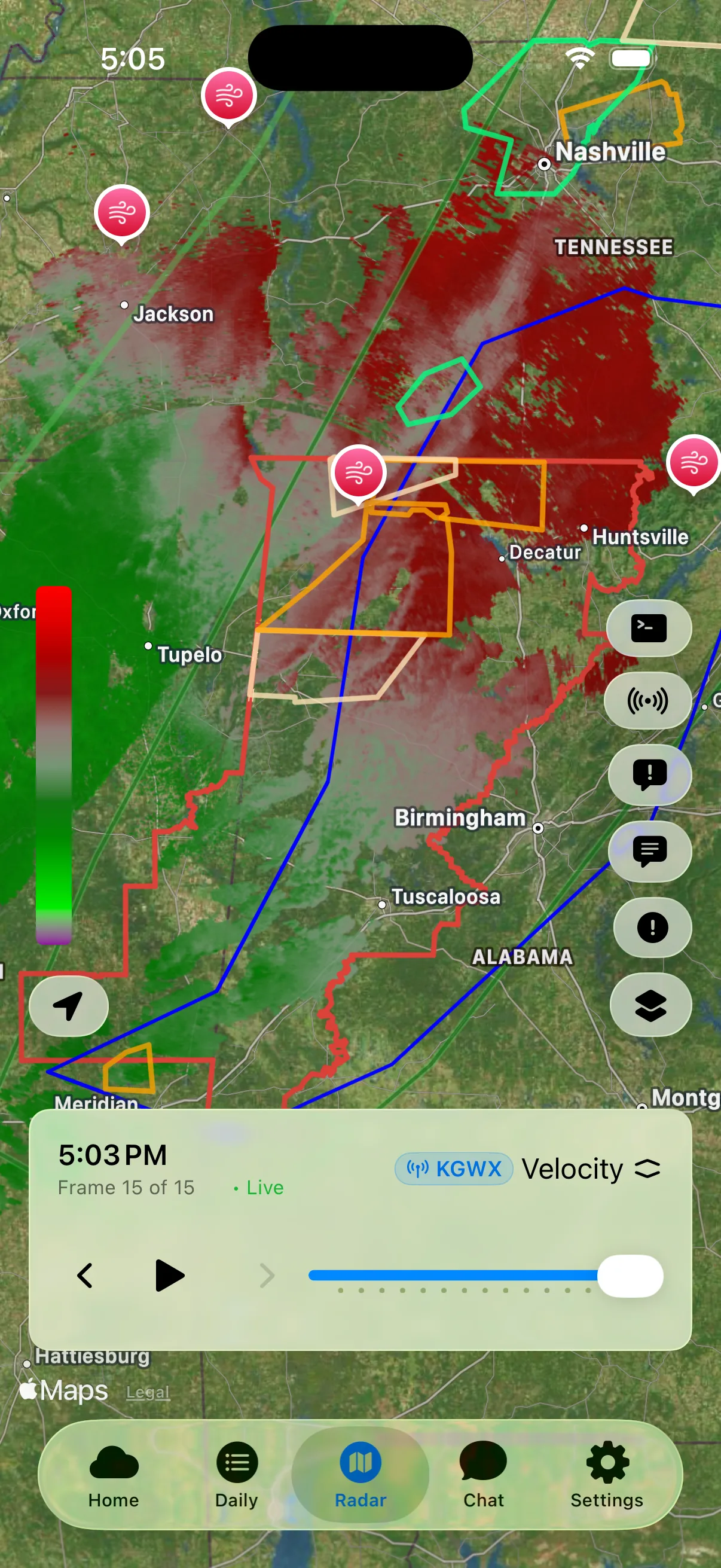
Velocity
Shows wind speed and direction toward or away from the radar. Red typically means winds moving away, green means winds moving toward the radar. Used to identify rotation in storms.
Pro tip: A tight pairing of inbound and outbound velocities (often displayed as adjacent green and red) is called a velocity couplet and may indicate storm-scale rotation. Adjacent colors alone do not confirm a tornado.
Correlation Coefficient
A dual-polarization product that helps identify how similar the targets are within a radar sample. High values usually indicate fairly uniform precipitation such as rain or snow. Lower values can indicate mixed precipitation types, hail, debris, biological targets, or other non-weather echoes, so correlation coefficient must be interpreted alongside reflectivity and velocity.
Radar Limitations
Understanding radar limitations helps you interpret data correctly:
Beam Height
Radar beams travel in straight lines while the Earth curves. Distant precipitation may be "underneath" the beam and not detected. Nearby storms are scanned at lower levels, giving a more complete picture.
Distance matters: A storm 100 miles away is being scanned thousands of feet above ground level.
Ground Clutter
Buildings, mountains, and wind farms can create false echoes. Most modern radars filter this out, but some anomalies remain.
Virga
Radar can show precipitation that evaporates before reaching the ground (called virga). Just because radar shows rain doesn't mean it's raining at the surface.
Winter Limitations
Snow reflects radar energy differently than rain. A snowstorm may appear as light green (low reflectivity) but produce heavy accumulation. The radar-to-snowfall relationship varies with snow density.
NEXRAD vs. MRMS
Two main radar systems cover the United States:
NEXRAD (WSR-88D)
- Network of 160 individual radar stations
- Each radar scans every 4-6 minutes
- Excellent resolution close to each radar site
- Coverage gaps in remote areas
MRMS (Multi-Radar Multi-Sensor)
- Combines all NEXRAD radars into one mosaic
- Updates every 2 minutes
- Integrates surface observations and satellite data
- Better coverage in gaps between individual radars
WeatherAI Pro includes NEXRAD Level 3 data and MRMS composite reflectivity for the most complete picture.
Reading Radar for Different Weather Types
Thunderstorms
Look for:
- Bright red/orange cores = strong reflectivity from heavy precipitation and possibly hail
- Rapid expansion may signal a strengthening storm
- Hook echoes = possible organized rotation; confirm with velocity and warnings
- Storm direction alone does not determine severity
Winter Storms
Look for:
- Persistent bands can signal locally intense snow rates
- Use a precipitation-type product and surface observations to locate the rain/snow transition; display colors vary
- Light green can still mean heavy snow
- Consider using surface observations alongside radar
Tropical Systems
Look for:
- Eye of the hurricane = calm center
- Eyewall = ring of most intense rain
- Rainbands = spiral arms with heavy rain and tornadoes
- Storm surge is NOT shown on radar
Tips for Reading Radar Effectively
1. Use Animation
A static image is a snapshot. Animation shows storm movement, development, and decay. Watch 1-2 hours of loop to understand the trend.
2. Check Update Times
Most radars update every 4-6 minutes. If data is old, conditions may have changed. Always check the timestamp.
3. Zoom Appropriately
Zoomed out shows the big picture. Zoomed in reveals storm structure. Use both views.
4. Consider Your Location
Remember that radar scans above the surface, especially farther from the radar site. Conditions within the beam can differ from what is reaching the ground.
5. Combine with Warnings
Radar shows what's happening. Warnings tell you what it means. Use both together.
Always Verify with Official Sources
Radar technology and display standards can change over time. While we strive for accuracy, always verify critical weather information with authoritative sources like the NWS radar product guide and NWS reflectivity guidance. When severe weather threatens, official warnings and radar from NWS should be your primary reference.
Frequently Asked Questions
What does green mean on weather radar?
Green means a weak to moderate return, roughly 5 to 35 dBZ. Light green is drizzle, light rain or light snow, mid green is light to moderate rain, and dark green is steady moderate rain. It is the least intense part of the reflectivity scale, but it is not always harmless: snow reflects far less energy than rain, so a band that stays green can still be producing heavy snowfall.
What does yellow mean on weather radar?
Yellow means a moderate to heavy return, roughly 35 to 40 dBZ. It usually marks the point where rain becomes heavy enough to cut visibility and cause ponding on roads. Yellow shading into orange (about 40 to 55 dBZ) is typical of a heavy downpour or the outer part of a thunderstorm core.
What does red mean on weather radar?
Red means an intense return, roughly 55 to 60 dBZ, with dark red running to about 65 dBZ. It usually marks the core of a thunderstorm, where rain is torrential and hail becomes possible. Red tells you where the strongest returns are, but it does not confirm a thunderstorm, hail or a tornado by itself.
What does purple mean on weather radar?
Purple or magenta means extreme reflectivity, roughly 65 dBZ and above. It is the top of the standard scale, and returns that strong often come from large hail or a mix of hail and very heavy rain. Many radar displays also use pink or purple for something entirely different: freezing rain, sleet or a wintry mix on a precipitation-type map. Check the legend to see which kind of map you are looking at.
Does purple on radar mean a tornado?
No. Purple on a reflectivity map shows where the radar return is strongest, which points to very heavy precipitation or hail, not rotation. Tornadoes are identified from other products: a tight velocity couplet, a hook echo, and a localized drop in correlation coefficient where debris is being lofted. A tornado warning from the NWS, not a color, is what you act on.
What dBZ counts as light rain versus heavy rain on radar?
On a typical reflectivity scale, green shades run from roughly 5 to 35 dBZ and cover drizzle through moderate rain, yellow and orange sit between about 35 and 55 dBZ for moderate to heavy rain, and red begins near 55 dBZ. The scale is logarithmic, so every 10 dBZ step is a tenfold increase in the reflectivity factor. A 60 dBZ core represents a reflectivity factor roughly a thousand times larger than a 30 dBZ area of steady rain, which is why the jump from green to red matters far more than the colors suggest.
Treat those numbers as approximate. Each provider picks its own colors and breakpoints, and dBZ measures the strength of the return rather than a rainfall rate, so precipitation type, drop size, hail and distance from the radar all shift the relationship between color and what is actually reaching the ground. Snow is the clearest example: a band that never leaves the green range can still be laying down heavy accumulating snow. Check the legend on whatever radar you are reading.
Does red on radar always mean hail?
No. Red means a very strong return, roughly 55 to 60 dBZ, and heavy rain with large drops can produce that on its own, particularly in tropical downpours. Hail can contribute from roughly 50 dBZ upward and becomes steadily more likely through the dark red and purple ranges above about 60 dBZ, but reflectivity alone cannot separate a lot of big raindrops from a core full of hailstones.
Confirmation comes from other products: a localized drop in correlation coefficient, a three-body scatter spike extending radially behind the storm, and the warnings and ground reports from your local NWS office. A red pixel is a reason to check those products, not a hail report by itself.
Why do radar maps sometimes show red and green right next to each other?
Usually because you are looking at a velocity product rather than reflectivity. On velocity, color means direction instead of intensity: red is air moving away from the radar and green is air moving toward it, so a tight red and green pair sitting side by side is a velocity couplet and a sign of possible storm-scale rotation. On reflectivity those same two colors sit at opposite ends of one intensity scale, which is why a red core normally appears nested inside orange, then yellow, then green rather than touching green directly. A very sharp gradient at a storm edge can squeeze those bands close together, but they still run in order.
Adjacent colors alone do not confirm a tornado. Forecasters look at how tight and how deep the couplet is, whether it persists across several scans, and what correlation coefficient shows in the same spot. The official warning, not the color pattern, is what you act on.
Why does the same storm look different on different weather apps?
Because each app picks its own color palette and often its own underlying product. The exact mapping of dBZ values to colors varies between providers, so a core that renders orange on one app can render red on another with no difference in the data at all. Beyond palette, base reflectivity shows a single elevation angle while composite reflectivity shows the maximum from every angle, so a storm carrying its heaviest precipitation aloft looks noticeably stronger in composite.
Source and timing matter too. An individual NEXRAD site completes a scan every 4 to 6 minutes, while the MRMS mosaic blends all the radars and updates every 2 minutes, so two apps can be showing the same storm several minutes apart. Before deciding one app is wrong, compare the legend and the timestamp.
What does correlation coefficient add that reflectivity cannot show?
Correlation coefficient tells you how similar the targets inside a radar sample are, which is something reflectivity has no way to express. High values point to fairly uniform precipitation such as rain or snow. Lower values point to a mixture: rain and hail together, melting snow, lofted tornado debris, birds and insects, or ground clutter and other non-weather echoes.
That extra dimension is what allows a tornado debris signature to be identified, by combining a tight velocity couplet, high reflectivity and a localized drop in correlation coefficient in the same place. On its own it is not a hail or tornado detector, because low values also turn up in ordinary situations such as the melting layer where snow changes to rain, so it has to be read alongside reflectivity and velocity.
Track Weather with WeatherAI Radar
WeatherAI makes radar interpretation simple:
- Live radar with fast tile loading
- Lightning layer showing real-time strikes
- Storm tracking with movement predictions
- Professional radar (NEXRAD L3, MRMS) with Pro subscription
- AI explanations - Ask "What does this storm mean for me?"
Don't just stare at colors. Get context. WeatherAI tells you what the radar means for your specific location.
Download WeatherAI for iPhone →
Want to learn more about professional radar features? Check out our Professional Radar page.
Keep Reading
These articles cover adjacent weather questions, practical explainers, and planning workflows related to this topic.
Weather Education
Radar Beam Height Explained: Why Distance From Radar Matters
Learn how radar beam height affects weather detection. Understand why storms far from radar may appear weaker and how Earth's curvature impacts precipitation detection.
Weather Education
How to Read Weather Radar Like a Meteorologist
Master weather radar interpretation with this complete guide. Learn to identify storms, track precipitation, and understand what those colors really mean.
Weather Education
Understanding Flash Floods: Causes, Warnings, and Safety
Learn what causes flash floods, how to spot the risk on radar, the difference between watches, warnings, and emergencies, and critical safety steps that save lives.
Useful Next Stops
Jump from the explainer into tools, feature pages, and seasonal hubs that deepen the topic.
Guide
How to Read Weather Radar
Learn the basics of radar interpretation so you can tell where storms are headed and how intense they may become.
Feature
Severe Weather
Follow outlooks, watches, warnings, and storm signals in one severe-weather workflow.
Guide
Radar Beam Height Explained
Learn why radar can miss low-level rain, snow, and storm details depending on distance from the radar site.
Glossary
Hail
Balls or irregular lumps of ice produced in severe thunderstorms.