WeatherAI on Apple Watch
A full weather app on your wrist: conditions now, the hours ahead, the days ahead, and the alerts in force where you are.
Requires watchOS 26 or later.
It Works on Its Own
Leave your iPhone at home. Over Wi-Fi or cellular, the watch app fetches its own forecast and receives alerts for wherever it is.
Out of signal
Offline, see your last forecast for up to 24 hours, with its age clearly shown.
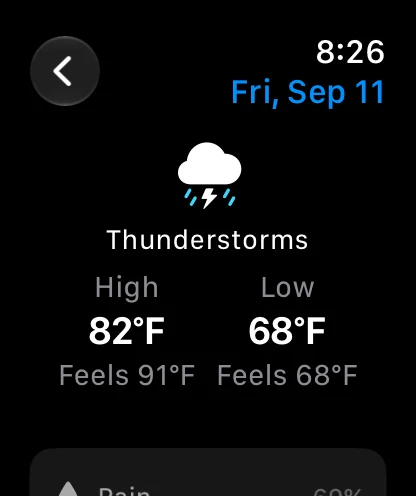
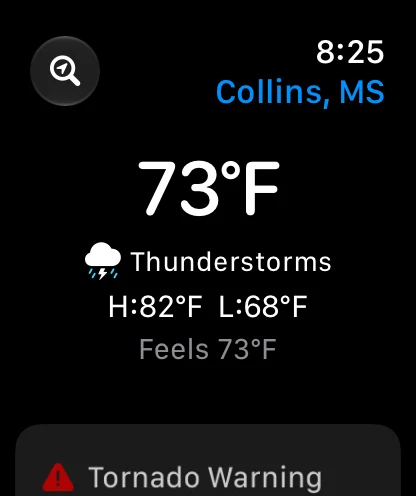
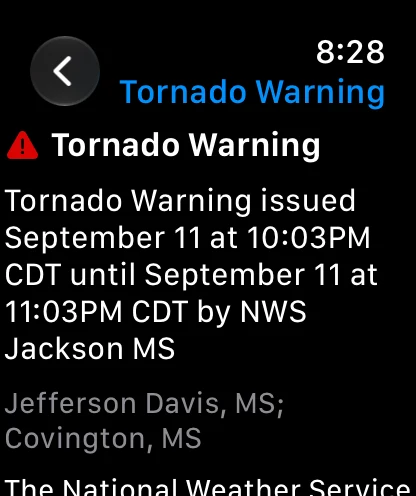
What You Get on the Watch
Current Conditions
Temperature, conditions, how it feels, and today's high and low, up front.
The Hours Ahead
The next few hours at a glance, with the full hourly forecast a tap away, grouped by day.
Day by Day
Open any day for precipitation chance, snowfall, wind and gusts, UV, humidity, sunrise, sunset, and the moon phase.
Active Alerts
Alerts in force where you are, in priority order, with the full text of each one and what to do about it.
Your Places
Switch between your current location, favorites synced from your iPhone, and recent places, or search for somewhere new.
Your Forecast Source
Choose from six forecast sources directly on your watch. XWeather, OpenWeather, and Open-Meteo require Pro.
Seven Complications
Keep conditions, rain chances, wind, UV, and sunrise or sunset times on your watch face. Choose your current location or a saved favorite.
Conditions
The sky and the temperature.
Temperature
The temperature now, between today's low and high.
Hourly Forecast
Temperature and rain chance for the next few hours.
Rain
The chance of rain or snow, and when it is likely.
UV Index
The UV index and its exposure level.
Wind
Wind speed and direction.
Sunrise and Sunset
The time of the next sunrise or sunset.
Alerts on the Watch Itself
The watch is notified of alerts for wherever it is, and the app lists every alert in force there, in priority order, with the full text of each one.
Sources. Notifications come from the U.S. National Weather Service, the Meteorological Service of Canada, and the U.K. Met Office. The alert list in the app also shows Meteoalarm alerts across parts of Europe, and Apple Weather alerts for a number of other countries with the issuing agency named.
What it needs. Notification and location permission granted on the watch itself, Nearby Alerts left on, and an internet connection.
Weather on Your Wrist
Download WeatherAI and the Apple Watch app comes with it. It is free to download on iPhone, iPad, Mac, Apple Watch, and Vision Pro, with optional subscriptions.
Open the camera on your iPhone
Frequently Asked Questions
Does the WeatherAI Apple Watch app work without my iPhone?
Yes. Over Wi-Fi or cellular, the watch app fetches forecasts and receives alerts while your iPhone is off or out of range. With no connection at all it shows your last forecast for up to 24 hours, with its age clearly shown.
Which weather alerts reach the watch?
The watch is notified of alerts for its own location from the U.S. National Weather Service, the Meteorological Service of Canada, and the U.K. Met Office. Open the app and the alert list also shows Meteoalarm alerts across parts of Europe, and Apple Weather alerts for a number of other countries, each naming the agency that issued it. Notifications need notification and location permission granted on the watch itself, Nearby Alerts left on, and an internet connection. They arrive as normal notifications: Critical Alerts, which sound through silent mode and Focus, are iPhone and iPad only.
Do I need a subscription for the Apple Watch app?
No. The watch app, its alerts, and the complications are part of the free download. Only the Pro forecast sources, XWeather, OpenWeather, and Open-Meteo, require Pro, and they are available on the watch whether or not your iPhone is with you.
Is there radar on the Apple Watch?
No. Radar, maps, AI chat, and the specialist hubs stay on iPhone, iPad, Mac, and Vision Pro. The watch app is built around the forecast and the alerts in force where you are.
What does WeatherAI need to run on Apple Watch?
watchOS 26 or later. The watch app installs alongside the iPhone app, and complications can follow your current location or any favorite you sync from your iPhone.
Related Reading & Tools
Deepen the topic with explainers, calculators, and adjacent features.
Feature
Widgets
At-a-glance weather on your iPhone home screen and lock screen, with current conditions, daily forecast, and earthquake widgets.
Feature
Custom Alerts
Set weather notifications that match the places and conditions you actually care about.
Use Case
Weather App for Runners
Time runs around heat, humidity, and air quality with hour-by-hour conditions.
Feature
Severe Weather
Follow outlooks, watches, warnings, and storm signals in one severe-weather workflow.